

部分Windows电脑系统用户在使用敬业签PC桌面便签软件登录账号后显示:登录中.....(一直卡在这里),如果使用微信登录或QQ登录打开后为空白页面。

原因:错误原因:This implementation is not part of the Windows Platform FIPS validated cryptographic algorithms.(此实现不是Windows平台FIPS验证的加密算法的一部分。)
解决办法:关闭系统本应用默认关闭的系统加密:将FIPS兼容算法用于加密、哈希和签名;
解决办法操作方法:
1、在Windows系统键盘上同时按下:Win+R 或 左下角开始找到运行打开,并在打开内输入:gpedit.msc ;
说明:Windows 找不到文件 'gpedit.msc'。请确定文件名是否正确后,再试一次。解决办法:https://www.jingyeqian.com/news-8078.html

2、输入后,点击确定打开:本地组策略编辑器;
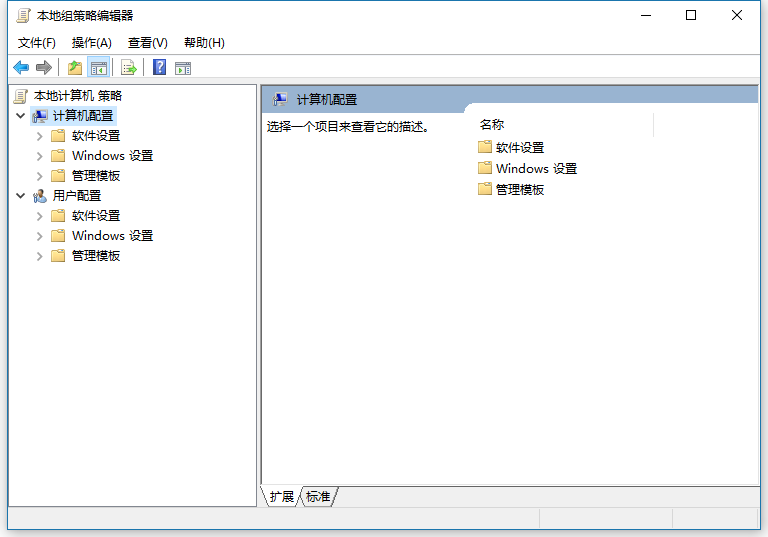
3、依次打开:计算机配置 > Windows设置 > 安全设置 > 本地策略 > 安全选项 找到:系统加密:将FIPS兼容算法用于加密、哈希和签名;

4、右键:属性;打开

5、在打开的本地安全设置内,将默认已开启更换成:已禁用,然后确定保存后,再次打开敬业签PC桌面便签软件登录即可成功。

2026-09-28 09:28:23
感谢您一直以来的信任与陪伴。无论是梳理工作待办、规划假期行程,还是记录旅途中的点滴美好,敬业签始终希望能做您身边最可靠的效率伙伴,陪您认真对待每一个平凡又珍贵的日子。
2026-09-23 08:36:03
中秋逢国庆,双节共欢畅。在这阖家团圆、喜迎华诞的美好时刻,感谢各位一直以来对敬业签的认可与陪伴。为回馈大家长久的支持,我们特别推出敬业签会员专属充值福利活动,超值优惠相伴,助你高效工作、轻松生活!
2026-09-17 13:00:00
选手机便签看起来简单,实际上比选对象还难。选对象你至少还知道自己想要什么:好看的、有钱的、性格好的。但选便签呢?所以我们不如换一个思路,从敬业签这款软件出发,一起聊聊好用的便签软件都应该具备怎样的优点。
2026-09-14 11:00:00
职场中有一个很容易被忽略的细节,那就是一味的忙碌并不等同于高效。当你的日程被“假性忙碌”填满时,你的工作体验一定会变得十分糟糕。真正的高效不是做了很多事,而是做成了对的事。而敬业签就不是那个让你做很多事的工具,它会帮你拒绝假性忙碌,让每一份付出都有长期结果。
2026-09-02 17:37:49
三尺讲台,四季耕耘。在教师节来临之际,为了感谢广大师生对教育事业的辛勤付出与热爱,敬业签特别推出“教师节专属福利”活动。无论是初识敬业签的新朋友,还是相伴已久的老用户,我们都为您准备了诚意满满的节日好礼。
2026-10-06 09:00:00
假期末尾,最怕的就是“假期综合征”了。尤其是当你焦虑的在手机里记了一堆计划,结果到了开工第一天,却发现还要将计划手动导出到工作电脑中的那种绝望感……所以,为了让咱开工能更加舒服,不如试试敬业签吧,它无缝切换的使用体验,正是为此刻而生的。
2026-10-05 09:00:00
来到假期末尾,与其在焦虑中盯着日历,不如提前给自己准备一个能让工作和生活都更加从容的“好东西”吧。而敬业签这种操作顺手、记录可靠的便签软件,就是咱们在职场中用起来更加舒服的好用便签,它将为你带来均衡的工作便签使用体验。
2026-10-04 09:00:00
每逢节假日,很多职场人都会面临一个无奈的情况:临时接到加班任务。假期加班已经够苦了,如果这时我们的工具还不顺手,那效率就更难提上来了。而敬业签就是为这一场景而设计的,让它帮你把“不想加班”的抗拒,变成“那就开始”的行动力吧。
2026-10-03 09:00:00
长假最奢侈的不是远方,而是终于有大把时间可以自由安排。但问题也来了:想做的事太多了,反而不知道该从哪件开始。所以呀,咱们每个人都需要一张能帮你理清思路的清单,而敬业签就是这样一款能贴在电脑桌面上的计划工具,把你脑子里的“想做什么”变成一条条清晰的“事项”,做起来就会更加直观。
2026-10-02 09:00:00
每到长假,自己下厨做饭的频率会明显提升。但即便咱平时刷遍了美食短视频,等到要做饭时却根本想不到。所以如果想要假期的饭做的又好又效率,提前列个菜谱真的很重要。而手机便签工具敬业签,就是你列菜谱的好帮手。
2025-12-04 13:55:39
2025-12-03 11:27:07
2025-12-02 13:11:50
2025-11-30 11:51:26
2025-11-29 10:15:25


 豫公网安备41070202000535号